
Solutions By use case Disputes & Litigation
Legal AI for disputes, litigation and arbitration : Support for every stage of a dispute, from the first notice to the final order
A practical look at where Jurisphere fits into disputes, litigation and arbitration work: research with cited authorities, first drafts as Word documents, and preparing for hearings. Your lawyers review every step.
- Every answer links to the judgment or provision behind it
- A List of Dates with a page reference on each entry
- Records in 22 Indian languages, translated into English
Ask JurisWhat are the limitation periods and procedural steps for a Section 138 complaint on a dishonoured Rs 12 lakh cheque, and where does the Supreme Court stand on interim compensation?
What are the limitation periods and procedural steps for a Section 138 complaint on a dishonoured Rs 12 lakh cheque, and where does the Supreme Court stand on interim compensation?
Short Answer
The statutory sequence for a Section 138 complaint is: presentment within the validity period, a written demand within 30 days of the bank's return information, a 15-day payment window, and a complaint within one month after that window ends. Interim compensation under Section 143A is discretionary and capped at 20% of the cheque amount. That is Rs 2.4 lakh on a Rs 12 lakh cheque.
The authoritative Supreme Court ruling on this is Rakesh Ranjan Shrivastava v. State of Jharkhand (2024). The Court has since encouraged early use of Section 143A in Sanjabij Tari v. Kishore S. Borcar (2025).
Legal Framework
Ingredients and notice
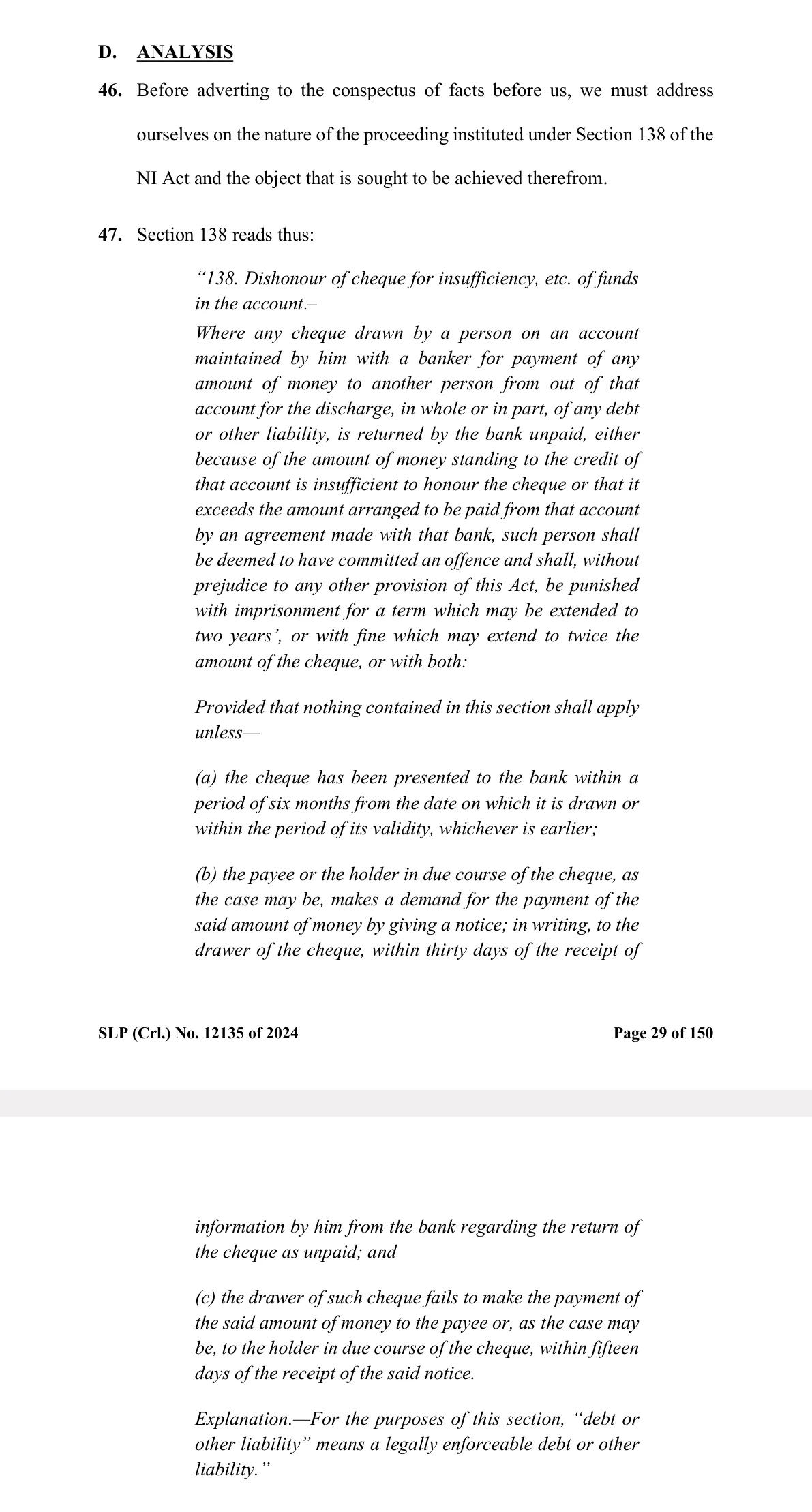
- Section 138 applies only if (a) the cheque was presented to the bank within six months of its date or within its validity period, whichever is earlier, (b) the payee gave a written demand notice within thirty days of receiving information from the bank of the return, and (c) the drawer failed to pay within fifteen days of receiving the notice. 1
- Penalty is imprisonment up to two years, a fine up to twice the cheque amount, or both. 2
Trusted by litigation and disputes teams
More than 500 legal teams use Jurisphere, including CMS IndusLaw, ICICI Bank and Tata Capital.
See customer storiesDisputes
Disputes: from the first notice to settlement
Before a matter reaches a court or tribunal: notices, replies, assessing the claim and working towards settlement.
-
Notice received
- What takes time
- Reading the notice and the contract it relies on.
- With Jurisphere
- A summary of the claim and the clauses behind it.
-
Assessing the claim
- What takes time
- Checking the law, limitation and how courts have treated similar claims.
- With Jurisphere
- Research answers with a link to each authority.
-
Reply and negotiation
- What takes time
- Drafting a considered reply under time pressure.
- With Jurisphere
- A first draft of the reply, as a formatted Word document.
-
Settlement or escalation
- What takes time
- Recording terms, or preparing the file for court or arbitration.
- With Jurisphere
- Draft settlement terms, or a case summary and a List of Dates.
Litigation
Litigation: from the brief to the final order
Court matters in the Supreme Court, High Courts, district courts and tribunals.
-
Brief and case file
- What takes time
- Reading a long file before the first conference.
- With Jurisphere
- Summaries, key facts and a List of Dates with page references.
-
Research and precedent
- What takes time
- Finding the current position across courts and checking it still holds.
- With Jurisphere
- Answers that link to the source judgments.
-
Pleadings
- What takes time
- First drafts of petitions, replies and written submissions.
- With Jurisphere
- Drafts written from your own documents, for you to revise.
-
Hearing preparation
- What takes time
- Synopses, compilations and finding things in the file mid-hearing.
- With Jurisphere
- Questions answered from the whole case file, with the page cited.
-
Orders and next steps
- What takes time
- Reading orders and records, some of them in Indian languages.
- With Jurisphere
- Order summaries, and translation that keeps the numbering and formatting.
Arbitration
Arbitration: from the notice to the award
Domestic and international arbitration, and what follows the award.
-
Notice and tribunal
- What takes time
- Reading the arbitration clause and drafting the notice.
- With Jurisphere
- A summary of the clause and a first draft of the notice.
-
Claim and defence
- What takes time
- Building the statement of claim or defence from the record.
- With Jurisphere
- Drafts that draw on the documents you upload.
-
Documents and evidence
- What takes time
- Reviewing large document sets and building a chronology.
- With Jurisphere
- The same questions asked of every document, and a List of Dates with references.
-
Hearings
- What takes time
- Keeping the record, transcripts and submissions at hand.
- With Jurisphere
- Questions answered from the record, with the page cited.
-
Award and after
- What takes time
- Reading the award and weighing a challenge or enforcement.
- With Jurisphere
- A summary of the award, and research on challenge and enforcement.
“Jurisphere has become an essential part of our legal workflow, as well as that of my colleagues. It significantly streamlines legal research and helps us efficiently generate structured documents such as lists of dates and initial drafts of pleadings. While we continue to apply our professional judgment to refine the outputs, it saves considerable time and enhances overall productivity, allowing us to focus more on strategy and analysis.”
“Jurisphere transforms the grind of sifting through endless paperwork into seamless efficiency. Cross referencing or locating documents and firming up legal propositions through Jurisphere has helped us address our matters in an efficacious manner.”
Walkthrough
See it on a real task: a List of Dates from a long case file
- 01
Upload.
Add the petition and its annexures to the matter.
- 02
Draft.
Jurisphere builds the list, with a page reference on every entry.
- 03
Check.
Open any entry at the page it came from, and correct what needs correcting.
- 04
Use.
Take the list into your brief, synopsis or written submissions.
Good places to start
Three things worth trying in your first week
-
Check the current position on a point of law
Ask in plain language. Read the answer, then open each cited judgment.
Try asking What is the current position on [point of law]? Cite Supreme Court and High Court decisions.
-
Prepare a List of Dates
Upload the petition and annexures. Check each entry against the page it came from.
Try asking Prepare a list of dates from these documents, with page references.
-
Translate a vernacular record
Upload a scanned FIR, order or deposition. The numbering and formatting are kept.
Try asking Translate this Marathi document into English, keeping the format.
How we think about it
What stays with the lawyer
-
You can check every source
Each answer links to the judgment or statute it relies on, so you read it yourself before you rely on it.
-
Drafts are a starting point
The advocate on record decides what is filed. Jurisphere gets you to a first draft sooner.
-
Your files stay yours
Your documents are not used to train any AI model, and they are encrypted in transit and at rest.
How we handle data
Features used here
The features behind this work
-
AI legal research.
Answers with a citation that opens the judgment, provision or circular it rests on.
Learn more -
AI legal drafting.
Formatted Word drafts written from the documents you attach.
Learn more -
AI legal translation.
Records in 22 Indian languages turned into English, with the numbering and formatting kept.
Learn more
Also see: law firms, independent advocates and enterprise legal teams.
Security
Built for confidential legal work
The questions your IT and risk teams will ask, answered up front. Jurisphere is ISO 27001 certified and SOC 2 Type 2 compliant. Customer content is not used to train, fine-tune or improve any AI model. Content is held in memory only for as long as it takes to generate a response, and all customer content is encrypted in transit and at rest. Firms can also choose where their data is hosted, including deployment within their own cloud environment where required.
The detail is on our security page and in the trust centre.
-

ISO 27001 certified
Certified information security management.
-

SOC 2 Type 2 compliant
Controls audited against industry standards.
-
Not used for training
No customer content trains, fine-tunes or improves any model.
-
Encrypted throughout
In transit and at rest, and held in memory only while answering.
Questions teams ask before they start
Which courts and tribunals does Jurisphere's research cover?
The Supreme Court, every High Court (reported and unreported judgments), Delhi District Courts and Bangalore City Civil Court. Tribunals include the NCLT, NCLAT, ITAT, SAT, CESTAT, NGT and NCDRC, and there is material from the RBI, SEBI, CCI, IRDAI and IBBI.
Can I use Jurisphere on my own files, and what happens to them?
Yes. Upload the documents to your workspace and work on them there. Customer content is not used to train or improve any AI model, and it is encrypted in transit and at rest. Our security page sets out the detail.
How do I check that a judgment Jurisphere cites is correct?
Every citation in an answer is a link. It opens the judgment, provision or circular in the file viewer at the passage the answer relies on, so you read the source yourself before you rely on it.
Can Jurisphere build a chronology or List of Dates from case documents?
Yes. Select up to 150 PDF or Word documents, such as the petition and its annexures, and Jurisphere builds a List of Dates with a page reference on every entry. Open any entry at the page it came from, correct what needs correcting, and take the list into your brief, synopsis or written submissions.
Does Jurisphere support arbitration work in India?
Yes. For an arbitration, Jurisphere summarises the arbitration clause and drafts the notice, drafts the statement of claim or defence from the documents you upload, builds a List of Dates with references, answers questions from the record with the page cited, and summarises the award with research on challenge and enforcement. The lawyers on the matter review every step.
Does Jurisphere work with documents in Indian languages?
Yes. Translation turns documents in 22 Indian languages into English, including scanned pages, and reads handwriting in Hindi, Marathi and Kannada. The numbering and formatting are kept, and you can check the English against the original side by side.
Can colleagues work on the same matter in Jurisphere?
Yes. A Project holds a matter's files and threads in one place, and the colleagues you add to it work from the same documents.
Related reading

Bring one matter. We will walk through it with you.
A 30-minute session with our team, on a document you choose. If Jurisphere is not the right fit yet, we will say so.