
- What it is
- An AI drafting and research tool on the web, with legal memos, Chat with PDF, argument tools and translation
- Built for
- Indian lawyers, law students, legal teams and businesses
- Based in
- Delhi, India
- Pricing
- A free plan; the Infinity plan at ₹999 a month; team and institutional pricing on request
- Free trial
- A free plan with 500 AI words a day, and a 7-day money-back guarantee on paid plans
Comparison
Draft Bot Pro vs Jurisphere: Low-cost AI drafting, or a workspace that goes beyond the draft?
Bring a live question and your own documents to the demo.
Ask JurisHow does Indian law treat a mistrial in a PMLA prosecution, and which provisions of the Act govern the procedure before the Special Court?
View Sources 13Assign ThreadNew Chat
How does Indian law treat a mistrial in a PMLA prosecution, and which provisions of the Act govern the procedure before the Special Court?
Effect of a Mistrial in PMLA Proceedings
Short Answer
Indian criminal procedure does not use the American term "mistrial"; the applicable jurisprudence speaks of a trial being "vitiated" by an illegality, irregularity or want of jurisdiction, which then raises the question of whether the appellate/superior court should quash the proceedings outright, direct a "retrial" (a continuation of the same prosecution, not a fresh one), or treat the defect as curable under the "failure of justice" test. Under the Prevention of Money Laundering Act, 2002 ("PMLA"), because the trial before the Special Court is conducted "in accordance with the provisions of the Code of Criminal Procedure, 1973 as it applies to a trial before a Court of Session" 1, the general CrPC/BNSS principles on vitiated trials and retrial apply, but they interact with PMLA's distinctive features: non-bailable twin conditions under Section 45 2 3, reverse burden of proof under Section 24 4, and a parallel, civil-law attachment/confiscation track under Sections 5 and 8 that is expressly designed to survive vicissitudes in the criminal trial 5 6.
Legal Framework
Trial procedure and cognizance
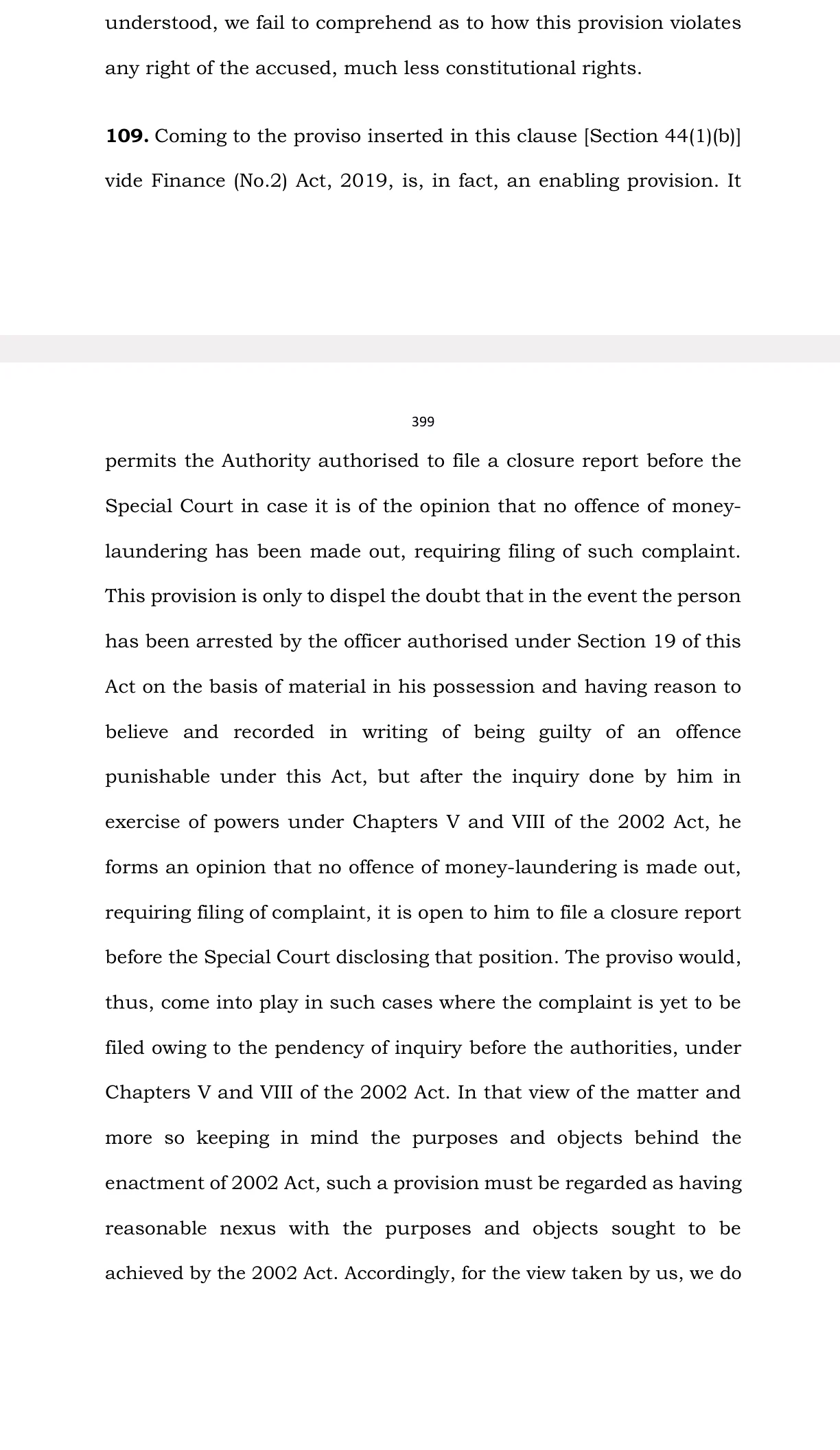
Section 44(1)(d) PMLA mandates that the Special Court, while trying the scheduled offence or the money-laundering offence, "shall hold trial in accordance with the provisions of the Code of Criminal Procedure, 1973...as it applies to a trial before a Court of Session" 1. The proviso to Section 44(1)(b) further permits the authority to file a closure report if, after conclusion of investigation, no money-laundering offence is made out: an enabling, not a punitive, provision 7 8.
VIJAY MADANLAL CHOUD....
100%399/ 545View Source
Summary
The short answer
Jurisphere suits teams whose work runs past the first draft: drafting from your own precedents and Skills, research cited to the Indian sources we publish, review across 1,000+ documents, redlining in Word against a playbook, translation from 22 Indian languages and MCA document retrieval. Draft Bot Pro suits advocates and law students who want a free plan and first drafts of Indian legal documents from typed facts or a reference PDF.
Choose Jurisphere if
Built for Indian practice- You want drafts from your own precedents and Skills, backed by research that opens each cited source.
- You review hundreds of documents at a time, negotiate in Word against a playbook or need a company's public MCA documents.
- Your clients expect a vendor that is ISO 27001:2022 certified and SOC 2 Type 2 compliant.
Choose Draft Bot Pro if
- You want a free plan to start, or full access for ₹999 a month.
- You mostly need first drafts of Indian pleadings, notices, affidavits and agreements, with research beside the draft.
At a glance
Draft Bot Pro and Jurisphere in brief
 AI legal workspace
- What it is
- An AI legal workspace for research, document review, drafting and translation
- Built for
- Law firms, in-house legal teams and advocates working on Indian matters
- Based in
- India
- Pricing
- Per-user plans; Jurisphere Translate: first pages free, then Rs 30 a page
- Free trial
- 7 days
Figures are as published by each organisation.
Feature by feature
Draft Bot Pro vs Jurisphere, capability by capability
A practical starting point for your evaluation, grouped the way legal teams work. Statuses reflect each product's public documentation.
Legend:YesPartialNot documentedNot offered
| Capability | Draft Bot Pro | |
|---|---|---|
| Research | ||
| Indian case law | Partial2.4 crore+ judgments, orders and more, readable in the app (company figure); courts are not itemised. | YesSupreme Court, every High Court (reported and unreported judgments), Delhi District Courts and Bangalore City Civil Court. |
| Tribunals and regulators | Not documented | YesNCLT, NCLAT, ITAT, SAT, CESTAT, NGT, NCDRC and more, plus RBI, SEBI, CCI, IRDAI and IBBI material. |
| Answers cited to the source | YesAnswers come with sources and judgments you can open and read in the app. | YesInline citations open the source beside the answer, and every answer lists the sources it used. |
| Other jurisdictions | Not documented | YesUAE, UK, US, EU, Canada, Singapore and Saudi Arabia sources alongside Indian law. |
| Your documents | ||
| Questions across your own documents | YesChat with PDF answers questions on a PDF of up to 600 pages and highlights the passage each answer uses. | YesAttach files to any question; answers point to the passage they rely on. |
| Bulk review across many documents | Not documentedChat with PDF works on a PDF of up to 600 pages. | YesParallel Review: up to 50 questions across 1,000+ documents (up to 5 GB) in one table. |
| List of Dates or chronology | YesChat with PDF prepares a list of dates from an uploaded PDF. | YesList of Dates from up to 150 documents, usually ready in 3 to 7 minutes. |
| Drafting and contracts | ||
| Drafting | YesDrafts Indian legal documents from typed facts or uploaded reference PDFs, with research alongside; download as Word or PDF. | YesDraft from your own precedents with Word (.docx) output, using your own Skills or the many we have built. |
| Word add-in with redlines | Not documentedYou edit drafts in its own editor, and Review Your Draft tracks the changes it makes. | YesSuggested insertions, deletions and rewrites you accept or reject, in Word on Windows, Mac and the web. |
| Review playbooks | Not documentedIts business page describes uploading a contract to find clauses unfavourable to you. | YesA starting position, fallbacks and a dealbreaker for each clause, applied in Word. |
| Languages and records | ||
| Indian-language translation | YesTranslates regional-language documents into English or Hindi, beside the original; the source languages are not listed. | YesTranslates from 22 Indian languages and 200+ in all, built to keep headings, numbering and simple tables. |
| Scanned and handwritten records | PartialChat with PDF says it reads phone-clicked and scanned PDFs; handwriting is not documented. | YesIn-house OCR for scans; handwriting in Hindi, Marathi, Kannada and English. |
| Company data and integrations | ||
| MCA company documents | Not documented | YesPull a company's public MCA documents into the workspace without the portal's search and payment steps. |
| Cloud drive and DMS connections | Not documented | PartialFor enterprise customers on request: folder sync with Google Drive, OneDrive, SharePoint and Dropbox, plus DocuSign. |
| Security and buying | ||
| Security certifications and audits | Not documentedSays it complies with leading security guidelines; no certification or audit is named. | YesISO 27001:2022 certified; SOC 2 Type 2 compliant. |
| Your data kept out of model training | PartialSays it never trains on your data, though a privacy policy page on its site says it may share information with third parties to train large language models. | YesWe never use your content to train, fine-tune or improve any AI model. |
| Pricing and trial | Free plan with 500 AI words a day. Infinity ₹999 a month, capped at 150,000 words a month by its fair usage policy. Team pricing on request. 7-day money-back guarantee. | Per-user plans with a 7-day free trial. Jurisphere Translate: first pages free, then Rs 30 a page. |
Partial means documented with limits, without specifics, or through a partner. Not documented means we could not find it on the vendor's official pages; it does not prove the capability is absent. Not offered marks something Jurisphere does not do today.
Who uses Jurisphere
200M+Primary-Source Documents to Search
22Indian Languages for Translation
15M+Documents Processed
500+Legal Teams













Jurisphere has become an essential part of our legal workflow, as well as that of my colleagues. It significantly streamlines legal research and helps us efficiently generate structured documents such as lists of dates and initial drafts of pleadings. While we continue to apply our professional judgment to refine the outputs, it saves considerable time and enhances overall productivity, allowing us to focus more on strategy and analysis.
In practice
Where we go further than Draft Bot Pro
Both products draft Indian legal documents with research beside the draft. The differences are in Word, how much of your own material you can work across, the sources behind each answer and regional-language records.
Negotiate in Word, against your own playbook
The Jurisphere Add-In for Word reviews the open document and suggests insertions, deletions and rewrites that you accept or reject one by one. Apply a Review Playbook to check every clause against your team's starting position, fallbacks and dealbreakers. Build the playbook once and reuse it on every MSA, NDA or lease, in Word on Windows, Mac or the web. See contract redlining.
How Draft Bot Pro approaches thisDraft Bot Pro works in its own editor: you edit a draft there and download it as a Word or PDF file, and Review Your Draft tracks the changes it makes to grammar, tone and length. A Word add-in and review playbooks are not documented on its pages.

4.2 The Service Provider shall bill the Customer through an invoice, in which case, full payment for the invoices issued must be received by Service Provider within three (3)thirty (30seven (7) days from the date of the invoice, provided that such invoice is accompanied by adequate supporting information to allow Customer to verify the charges.
5. TERM AND TERMINATION
Jurisphere Add-In for Word
Ask JurisReview PlaybooksSettings
Not Acceptable5 Items
Payment Terms (Invoice Payment Period): Not AcceptableMandatory
Clause 4.2 sets the invoice payment period at thirty (30) days from the date of invoice (shown as a tracked change from three (3) days), which exceeds the fourteen (14) day threshold in the Not Acceptable position for this rule.1
Hide
Generated Edits (1)Clear & Regenerate
Shorten invoice payment term to 7 days (Section 4)Applied
Termination for Non-Payment: Not Acceptable - 30-day notice period exceeds capMandatory
Questions and a List of Dates from your own files
Attach a contract, a pleading or a full case bundle to any question. Answers point to the passage they rely on, and you can bring Indian case law into the same thread. List of Dates turns up to 150 documents into a chronology, usually in 3 to 7 minutes. Explore AI legal research.
How Draft Bot Pro approaches thisChat with PDF answers questions on a PDF of up to 600 pages, highlights the passage behind each answer and prepares a list of dates; uploaded files are deleted after 7 days. Working across many documents at once is not documented on Draft Bot Pro's pages.
No.DateParticulars
613.08.2018
The Complainant paid ₹13,100/- and took the PTE (Pearson Test of English) exam, scoring 70 out of 90. 6 This was part of the visa application process as per instructions from the Opposite Party. 6
717.09.2018
Following the Opposite Party's advice to retake the PTE exam to strengthen the application, the Complainant paid an additional ₹11,102/- and retook the exam. 6 7 The Complainant achieved a superior score of 90/90 and submitted the results to the Opposite Party, bringing total PTE exam expenses to ₹24,202/-. 6 7
List of Dates Chat
When did the complainant pay 13 thousand rupees?
The Complainant paid ₹13,100/- on 13-08-2018 towards the PTE (Pearson Test of English) exam as part of the visa application process. 1
Indian sources you can check
We publish the Indian sources behind every answer: the Supreme Court, every High Court (reported and unreported judgments), Delhi District Courts and Bangalore City Civil Court; tribunals including NCLT, NCLAT, ITAT, SAT, CESTAT, NGT and NCDRC; and regulators including RBI, SEBI, CCI, IRDAI and IBBI. When a matter crosses borders, you can add UAE, UK, US, EU, Canada, Singapore and Saudi Arabia sources to your research. Explore AI legal research.
How Draft Bot Pro approaches thisDraft Bot Pro says you can read 2.4 crore+ judgments, orders and more in its app (company figure), and each answer lists landmark and similar judgments you can open. It does not list the courts, tribunals or date ranges behind them.
Settings
Research
Web Search
 Jurisphere India Web SearchIndian Legal Database
 US Case Law Database
 UAE Legal Database
 UK Legal Database
 Canada Legal Database
 EU Legal Database
 Singapore Legal Database
 KSA Legal Database
Repositories
Corporate Law
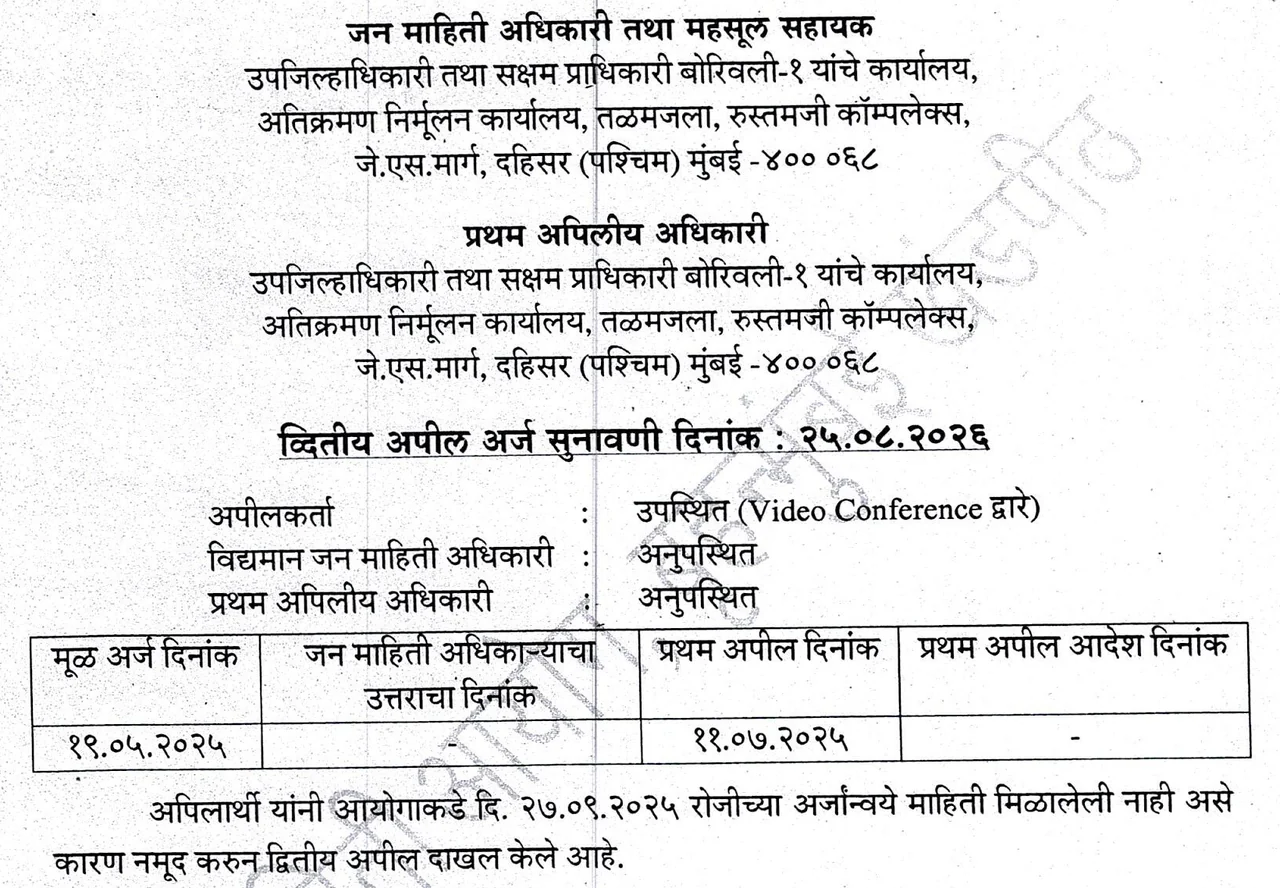
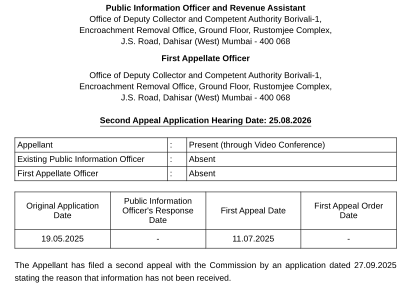
Regional-language records, scans included
Translate documents from 22 Indian languages, and from more than 200 languages in all. Our in-house OCR reads scans, and handwriting is supported in Hindi, Marathi, Kannada and English. Jurisphere is built to keep headings, numbering, indentation and simple tables, so you can check the translation line by line, then research, review or draft from it without switching tools. See AI legal translation.
How Draft Bot Pro approaches thisDraft Bot Pro translates regional-language documents into English or Hindi, shows the original beside the translation, flags words it is unsure of and exports a Word file that it says keeps tables and formatting where supported. Its pages do not list the source languages or mention handwriting. Chat with PDF says it reads phone-clicked and scanned PDFs.
Decision guide
Who should choose which?
A quick guide by team type. If two options look close, run the same pilot on both.
| Your team | Start with | Why |
|---|---|---|
| Litigation team with large case bundles | Jurisphere | Parallel Review across 1,000+ documents, and List of Dates from up to 150 documents. |
| Transactional or in-house team | Jurisphere | The Jurisphere Add-In for Word with Review Playbooks, plus MCA document retrieval. |
| Firm answering client security questionnaires | Jurisphere | ISO 27001:2022 certified and SOC 2 Type 2 compliant; Draft Bot Pro names no certification on its pages. |
| Advocate drafting routine notices and pleadings | Evaluate both | Draft the same matter in both from the same reference document and compare the results. |
| Law student or advocate starting out | Draft Bot Pro | A free plan, and full access for ₹999 a month. |
Evaluate
Test both on one real matter
Five checks to run on both products before you decide.
Ask a live question
Use a question from a current matter. Check that each proposition is cited and that the citation opens the passage it relies on.
Upload a real document set
Take 100 to 500 documents from a closed matter and time how long it takes to get a table of answers you trust.
Try your hardest file
A scanned or stamped record in a regional language, or a handwritten one in Hindi, Marathi or Kannada. See what comes back.
Redline in Word
Run a contract against your team's playbook inside Word and count the edits you keep.
Ask for the security pack
Certifications, data-use terms and hosting region, in writing, before any client file goes in.
Security
Security and data use
Ask every vendor for the documents your security team needs: certifications, data-use terms, retention and hosting region. Jurisphere's SOC 2 and ISO 27001:2022 documents are listed in its Trust Centre, and its approach is summarised on the security page.
Visit the Trust Centre
ISO 27001
Certified information security management (ISO 27001:2022).

SOC 2 Type 2 compliant.
Internal controls and data security practices, audited.
- Customer content is never used to train, fine-tune or improve any AI model
- Encrypted in transit and at rest
- Google and Microsoft sign-in, two-step verification and admin roles
How Draft Bot Pro describes its securityDraft Bot Pro says it complies with leading security guidelines, that no session data is accessible to its team, that it never trains on your data, and that files uploaded to Chat with PDF are deleted after 7 days. It names no certification or audit, and its pages do not name a hosting region. Its policies differ on model training: the privacy policy linked from its footer covers sharing information with third parties for email delivery and marketing, while a separate privacy policy page on its site also lists training of large language models, anonymised where possible. Ask each vendor for its security documentation and data-use terms in writing.
FAQ
Questions buyers ask
How is Jurisphere different from Draft Bot Pro?
The difference matters most if your work goes beyond the first draft. Both draft Indian legal documents with research beside the draft. Jurisphere drafts from your own precedents and Skills, and adds Parallel Review across 1,000+ documents, the Jurisphere Add-In for Word with Review Playbooks, translation from 22 Indian languages and MCA document retrieval. Draft Bot Pro publishes its prices and has a free plan.
How is Draft Bot Pro priced?
Draft Bot Pro has a free plan with 500 AI words a day and an Infinity plan at ₹999 a month, which its fair usage policy caps at 150,000 words a month, counting both the text you upload and the output. Team and institutional pricing is on request, and new subscribers get a 7-day money-back guarantee. We offer per-user plans with a 7-day free trial.
Can Draft Bot Pro draft from my own documents?
Yes. You can type the facts or upload reference PDFs, such as an impugned judgment or a notice you are replying to, and Draft Bot Pro chooses the format and drafts, with research in a separate Research tab. You finish the draft in its editor and download a Word or PDF file. Jurisphere drafts from your own precedents with Word (.docx) output, using your own Skills or the many we have built, and its research answers carry inline citations that open the source.
Does Draft Bot Pro have a Word add-in?
A Word add-in is not documented on Draft Bot Pro's pages. Drafts are edited in its own editor and downloaded as Word or PDF files, and its Review Your Draft tool tracks the changes it makes. The Jurisphere Add-In for Word suggests insertions, deletions and rewrites you accept or reject, and applies your Review Playbook clause by clause.
Does Draft Bot Pro translate Indian languages?
Yes. Its translation page offers regional-language documents translated into English or Hindi, with the original shown beside the translation and uncertain words flagged, but it does not list the source languages. Jurisphere translates from 22 Indian languages and supports handwriting in Hindi, Marathi, Kannada and English. Jurisphere Translate's first pages are free, then Rs 30 a page.
Can I try Jurisphere for free?
Yes. Start a 7-day free trial at app.jurisphere.ai, or book a demo and bring a live matter. Draft Bot Pro has a free plan with 500 AI words a day.
Should I check AI citations before relying on them?
Yes. Open every cited judgment, read the paragraph and confirm the case is still good law before you rely on it or file it. Jurisphere opens the source beside the answer so that check is quick, but the lawyer signing the work remains responsible for it.
How we compared
We reviewed Draft Bot Pro's public websites (draftbotpro.com and rarelabs.co), product and pricing pages, fair usage policy, privacy policies and terms, alongside Jurisphere's own help centre, Trust Centre and privacy policy. Company figures are as each company publishes them.
"Not documented" means we could not find a capability on the vendor's official pages. It does not prove the capability is absent. Products and prices change often, so confirm details with each vendor before you decide. This page is not a controlled benchmark.
Product names are the property of their respective owners and are used here only to identify the products. Jurisphere is not affiliated with or endorsed by Rarelabs Private Limited.
Spotted something out of date? Email contact@jurisphere.ai and we will review it.

See Jurisphere on your own matter.
Bring a live question and a real document set. Check every citation, run a review and see how it fits your team's work.